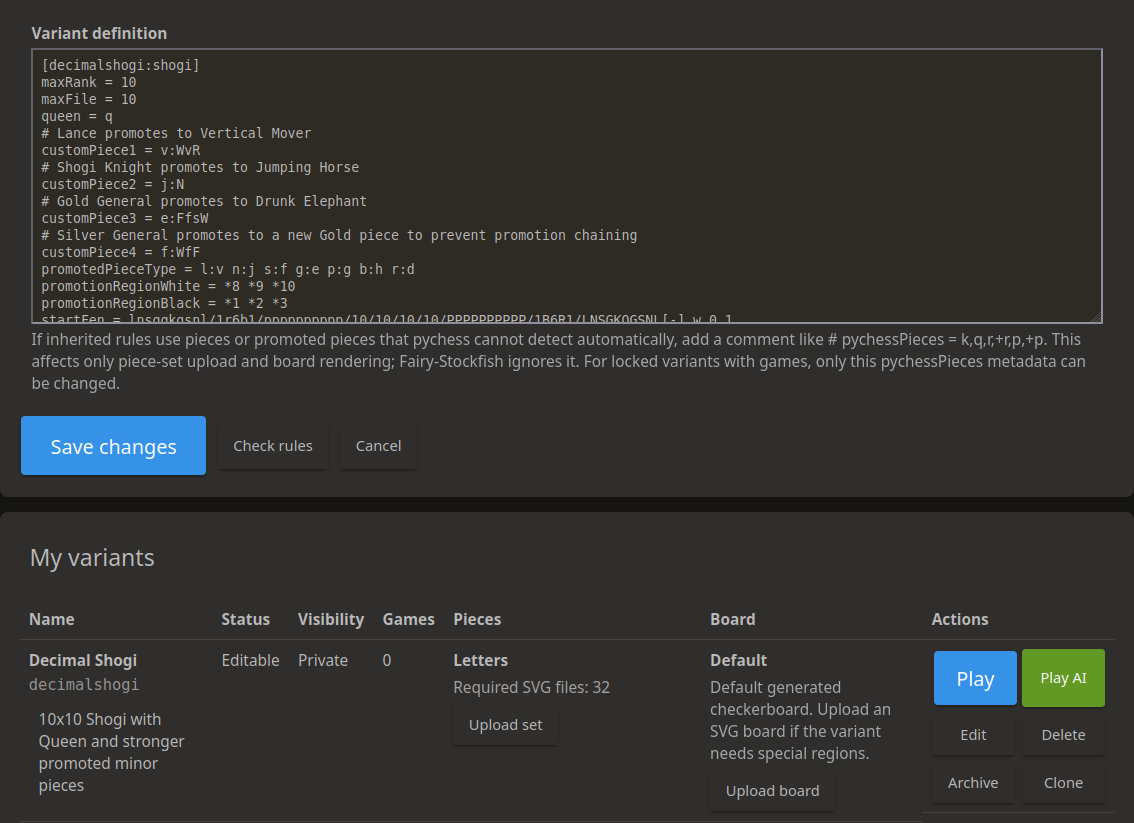
Create Your Own Variants gbtami 2026-07-07 1340 views en New variant moratorium is over. Forever. *"Anyone can invent a new chess variant within ten seconds (try it) and unfortunately some people do."* D.B. Pritchard We are happy to announce one of the biggest PyChess features so far: **user-defined variants**. Until now, adding a new variant to PyChess required code changes, deployment work, new graphics, and a lot of coordination. With this update, signed-in users can create their own playable variants directly on the site by uploading a Fairy-Stockfish style rules definition. You can test the variant against the AI, invite other players, add a custom piece set or board, and finally publish it as a community variant when it is ready. This does **not** mean that every possible chess-like game can be supported automatically. PyChess still needs to understand the board, moves, pieces, clocks, notation, game saving, spectators, and UI. But many variants that can be described with Fairy-Stockfish's `variants.ini` format can now be tested and shared without waiting for a full site release. ## Where to start Go to **My variants** from TOOLS menu. There you can upload, check, edit, clone, archive, delete, test, and decorate your own variants. The basic workflow is: 1. Write a Fairy-Stockfish `variants.ini` definition for your variant. 2. Paste it into the **Upload new variant** form. 3. Add a display name and description. 4. Start with **Private** visibility. 5. Use **Check rules** to validate the definition. 6. Upload the variant. 7. Test it against Fairy-Stockfish or with another player. 8. Refine the rules while it is still private. 9. Optionally upload custom SVG pieces and a custom SVG board. 10. Change the visibility to **Public** when the variant is ready for the community. This private-first workflow is strongly recommended. Variant design usually needs playtesting. Sometimes the first version is too sharp, too drawish, unbalanced, or simply has a typo in the rules. Private variants are meant to be a safe sandbox for this. ## What is Fairy-Stockfish `variants.ini`? PyChess uses [Fairy-Stockfish](https://github.com/fairy-stockfish/Fairy-Stockfish) for many chess variants. Fairy-Stockfish is a chess variant engine derived from Stockfish and designed to support many regional, historical, fairy, and custom variants. Fairy-Stockfish custom variants are described with an INI-style configuration format, usually called `variants.ini`. A custom variant definition can describe things such as: * the base or inherited variant, * board size, * piece types and their movements, * starting position, * castling rules, * promotion rules, * drops and pockets, * checking and royal pieces, * win/loss/draw conditions, * special regions of the board. You can read the Fairy-Stockfish custom variant documentation here: [https://fairy-stockfish.github.io/custom-variants/](https://fairy-stockfish.github.io/custom-variants/) The main Fairy-Stockfish `variants.ini` file is also very useful because it contains many real examples: [https://github.com/fairy-stockfish/Fairy-Stockfish/blob/master/src/variants.ini](https://github.com/fairy-stockfish/Fairy-Stockfish/blob/master/src/variants.ini) A very small definition can look like this: ```ini [myvariant:chess] ## inherits chess rules through the section suffix ``` Real variants are usually more interesting than that, of course. They may define custom pieces, a different board size, special promotion rules, pockets, regions, or a completely different starting position. The section name, such as `[myvariant:chess]`, is important. It becomes the internal variant key used by the site and by Fairy-Stockfish. Variant keys must be short, lowercase, and unique. If you change the rules while testing, it is usually best to also change the section name, because an already loaded runtime variant cannot always be safely replaced under the same key. ## Not every Fairy-Stockfish rule is supported Fairy-Stockfish is very powerful, but PyChess also needs to display and save the game correctly in the browser. For that reason, uploaded variants go through additional PyChess validation. The **Check rules** button tries to catch unsupported or unsafe definitions before the variant is saved. Some Fairy-Stockfish options need special UI support, special move input, special adjudication, or special multiplayer logic. Those options may be rejected even if Fairy-Stockfish itself understands them. This is intentional. It is better to reject a rule clearly than to allow a variant that later breaks move input, game saving, analysis, clocks, spectators, or old game replays. If your definition is rejected, read the error message carefully. Often the solution is to simplify the rule, use a closer existing template, or ask for help in the PyChess community. Some Fairy-Stockfish rule names can also be confusing because they are only relevant to WinBoard/XBoard compatibility and are not used by PyChess itself. In particular, `variantTemplate`, `pieceToCharTable`, and `pocketSize` are WinBoard/XBoard-specific settings. PyChess does not use them for its browser UI, piece mapping, pockets, game saving, or multiplayer logic. ## Visibility: private, unlisted, public Visibility is an important part of the new workflow. ### Private Private variants are visible only to you and site admins. This is the best mode for early testing. Use **Private** when: * the rules are still changing, * you are checking whether the variant loads at all, * you want to test against Fairy-Stockfish, * you are still preparing the piece set or board, * you are not ready for other players to find it. Private variant games are sandbox games. They are playable, but they are **not saved** in the public game database. This means you can freely delete or replace unfinished experiments, as long as there is no active game still running. ### Unlisted Unlisted variants do not appear on the public Community variants page, but they can be opened by direct link. Use **Unlisted** when: * you want to share a test version with a few people, * you want feedback before publishing, * the variant is playable but not polished, * you do not want it shown in public browsing yet. Like private variants, unlisted variants are still sandbox variants. Their games are playable, but they are **not saved**. This keeps the testing phase flexible. ### Public Public variants appear on the Community variants page and are meant for real community play. Use **Public** when: * the rules are stable, * the variant has been tested, * the description is clear enough for new players, * the board and pieces are usable, * you are ready for games to be saved. Public variant games are saved. After the first saved public game, the rules are locked so old games remain replayable with the exact rules they were played under. You can still update metadata such as the description or visibility, but if you want to change the rules, use **Clone** and publish a new version. ## Playing user-defined variants User-defined variants are always **casual/unrated**. They do not affect ratings. Normal real-time games can be played from the variant page, from My variants, or from the community pages. Public variants can be played by anyone, including anonymous users, just like other casual games. Fairy-Stockfish AI play is available when the engine can understand the uploaded rules. This is especially useful during private testing, because you can quickly check whether the variant behaves as expected. Correspondence games are supported for public user-defined variants. As usual on PyChess, anonymous users cannot play correspondence games. This rule is global and independent of user-defined variants. Tournaments can also use public user-defined variants, but they are **unrated only**. This makes it possible to organize community events without mixing experimental variants into rating pools. Simuls are supported for public user-defined variants as well. Like the rest of the feature, these games are casual. ## Game saving and rule locking The new system separates testing from publishing. Private and unlisted variants are for experimentation. Their games are not saved. This avoids filling the database with half-baked test games and lets authors delete or replace early versions. Public variants are for durable community play. Their games are saved. Once a public variant has saved games, its rules are locked. This protects game history, PGN export, analysis, and replays. This is why the recommended workflow is: ```text Private → test → refine → optional unlisted feedback → public release ``` If you later discover that a public variant needs a rule change, do not overwrite the old rules. Clone the variant, give the new version a new internal section name, test it privately, and publish the corrected version when it is ready. ## Custom piece sets Many variants can use existing PyChess piece styles automatically. If your uploaded rules use ordinary chess pieces, or pieces compatible with an existing piece family, PyChess may offer those built-in styles without requiring a custom upload. If the built-in styles are not enough, you can upload a custom SVG piece set from **My variants**. A custom piece set must be **complete and exact**. The page shows how many SVG files are required. The server expects one SVG for every required white and black piece, including promoted pieces when the variant needs them. Filenames must follow the expected pattern, for example: ```text wP.svg bP.svg w+P.svg b+P.svg ``` The exact required filenames depend on the pieces used by your variant. Extra files are rejected, missing files are rejected, and duplicate files are rejected. This strictness prevents broken boards where some pieces render correctly and others disappear. After uploading a piece set, use **Preview** to check it. You can delete the custom set later if you want to return to the automatically selected built-in styles or the default letter pieces. For best results, use simple, self-contained SVG files. Avoid scripts, external images, external fonts, and unnecessary metadata. SVG uploads are sanitized for safety, so complicated SVG features may be removed or rejected. ## Custom boards Some variants need more than a checkerboard. They may have palaces, rivers, promotion zones, camps, special regions, or decorative markings that help players understand the rules. For these variants, you can upload one custom SVG board. The board SVG is used as the board background. It must match the variant board's aspect ratio. For example, an 8x8 board needs a square viewBox, while a 10x8 board needs a 10:8 ratio. If the aspect ratio does not match, the upload is rejected so the board does not become stretched or misaligned. A custom board is especially useful when the rules mention regions. Even if the engine understands the region, players need to see it. Clear board art can make a new variant much easier to learn. As with piece SVGs, board SVGs are sanitized. Use simple, self-contained SVG artwork. ## Variant pages and generated rule help Public user-defined variants get their own pages, similar to built-in variants. PyChess tries to generate helpful information from the uploaded rules, including a starting board preview and rule summaries where possible. For pieces described with Betza-style movement notation, PyChess may also show movement diagrams. These generated diagrams are meant to help players learn the pieces faster. Still, automatic documentation cannot replace a good human explanation. Please write a clear description for your variant. Tell players the goal, what is different from chess, what the special pieces do, and what they should watch out for in their first game. ## Community variants Public variants appear on the Community variants page. From there, players can browse, search, favorite, and start games. A good public listing should have: * a clear display name, * a useful short description, * stable rules, * understandable pieces, * a readable board, * enough testing to avoid obvious forced wins or broken starts. Please do not publish many tiny test variants. Use private and unlisted visibility for experiments, then publish the variants you really want other people to play. ## Archiving, deleting, and cloning **Delete** is for variants that have no saved public games and no active games. It is useful for failed experiments and private tests. **Archive** hides a variant without deleting its history. Use archive when a public variant already has saved games but you no longer want it actively listed. **Clone** creates a new copy. Use clone when you want to make a new version of a variant whose rules are already locked, or when you want to experiment without touching the original. Because public game history must remain replayable, changing the rules of a public variant after saved games exist is not allowed. This is a feature, not a bug. ## Frequently asked questions ### Can anonymous users play user-defined variants? Yes, anonymous users can play normal casual games of public user-defined variants. They cannot manage variants, and they cannot play correspondence games. ### Are user-defined variants rated? No. User-defined variant games are casual/unrated. Tournaments using user-defined variants are also unrated. ### Can I test my private variant against the AI? Yes. This is one of the main reasons private variants exist. ### Why are my private or unlisted test games not saved? Because private and unlisted variants are sandbox modes. This lets authors refine or delete early versions without leaving broken test games in the public database. ### Why are rules locked after public games are saved? Saved games must remain replayable. If the rules changed underneath an old game, the replay, notation, analysis, and result could become wrong. ### Can I upload only one missing piece SVG? No. Custom piece sets must be complete and exact. This prevents partially broken boards. ### Can I use PNG pieces or a PNG board? No. Custom assets must be SVG. ### Can every Fairy-Stockfish variant be uploaded? No. Fairy-Stockfish supports many things, but PyChess also needs browser UI, game saving, notation, multiplayer, and safety support. Some rules are rejected until the site can support them properly. ### Where should I report bugs? Please report issues on GitHub or Discord. When reporting a problem with a user-defined variant, include the variant name, the `variants.ini` definition, and what you expected to happen. ## Thank you This feature is a big step toward making PyChess a place where the community can not only play variants, but also create them, test them, improve them, and share them. PyChess also reserves the right to suspend, hide, archive, or delete user-defined variants when necessary. This includes variants that cause Fairy-Stockfish crashes or stability problems, and variants that are clearly spam, trolling, abusive, or have no real value for other users. This is not meant to limit creative variant design; it is needed to keep the site stable and useful for the community. Have fun experimenting, and please publish only the variants you are ready for others to enjoy! <iframe width="560" height="315" src="https://www.youtube.com/embed/sTCEh3EMyu0" frameborder="0" allowfullscreen></iframe> -gbtami (co-authored with codex, gpt-5.6-sol) Discuss this blog post in the forum 33 Likes You may also like Studies Are Here Now With Interactive Lessons and Computer Practice Teams, Simuls, and More A big community update After Xiangfu: Big Update New variants, community tools, and quality-of-life upgrades